Showing posts with label Math Games. Show all posts

Tuesday, October 27, 2020

Dice, Decks, and Boards: Math Sprint – The Mental Math Game

Text: Dice, Decks, and Boards: Math Sprint – The Mental Math Game; cover of board game; logo of A Mom's Quest to Teach

Disclaimer: I received a FREE copy of this product through the HOMESCHOOL REVIEW CREW in exchange for my honest review. I was not required to write a positive review, nor was I compensated in any other way.

We love playing games in our house, and those games that also help our children with their homeschooling and education have a special place on our shelves. If you are looking for a fun and educational way for your children to review their math skills, then you should definitely check out the latest game from Byron's Games. Math Sprint – The Mental Math Game has been a welcome addition to our game-schooling time as everyone in our family joins in to answer questions on one of the over 250 cards. 

Reviewing Math Sprint from Byron's Games has been so much fun with our children. Several nights, after dinner, we brought out the game to test our addition and subtraction skills. There are multiplication and division questions and word problems, but we used only those cards with addition and subtraction as we have a kindergartner, second-grader, and senior. If our children were older, we would have used all the cards provided. 

Recommend for ages 7+ --- 2 to 8 players --- 30 minutes of gameplay 


cover of Math Sprint game box


And Just What Do You Get in Your Bright Blue Box? 


  • Instructions 
  • One running track board (for gameplay) 
  • 258 Cards: These are divided into the following categories  
    • 92 addition and subtraction cards 
    • 106 multiplication and division cards 
    • 30 wild cards 
    • 30 challenge cards 
  • 10 dry erase cards (so you can make up your own questions) 
  • One dry erase marker 
  • 8 Runner playing pieces in 8 different colors (there are character names and pictures on the instruction sheet) 


Text: Dice, Decks, and Boards: Math Sprint – The Mental Math Game; Practice your mental math skills as you race around the board; image of cards & board game


How Do You Play Math Sprint? 


Math Spring allows you to be very flexible in game play based upon the ages and levels of the children playing the game. The objective of the game is to get to the finish line by answering the mental math questions correctly. You can include both the addition/subtraction cards and the multiplication/division cards or just one stack. (We only included the addition/subtraction cards. We did not use all of the wild cards and used none of the challenge cards when we played.) 

After you pick your playing piece – do you want to be Crystal Reaction, Bootstrap Byron, or one of the other characters – you put your runner in one of the lanes on the track labeled 1 to 8. There are three different lengths of gameplay available to you and your homeschooled children. You can run a 100m, 200m, or 400m game. The longer distances are better for advanced players or for after you have played Math Sprint several times. 

board game of Math Sprint

The first time we played, I misread the rules, and we only moved the runner forward one space after answering a question correctly. We fixed that error the next time we played, which made the game faster and more enjoyable for our five-year-old daughter. We liked the wild cards that allowed our runners to move forward additional spaces without having to answer mathematics questions.  

Each time we have played the game, we only raced the 100m dash, but both our younger children enjoy doing the ten jumping jacks as they get to the half-way point on the track. If we were playing the 200m dash, they would have five hops and ten arm circles to incorporate into the game. And if we were to play the 400m dash, the game incorporates balancing on one leg for five seconds, jogging in place for fifteen seconds, and ten torso twists. So even though children are not really running around a track, they are still getting their exercise!


examining the cards of Math Sprint and the board game


How Did We Use Math Sprint in Our Homeschool? 


We played the game after dinner time so that everyone – my husband, our homeschooled high school senior, our seven-year-old son, our five-year-old daughter, and myself – could play. Our family enjoyed that the "Coach" got to choose who would answer the question – everyone or just two runners. We quickly learned that our youngest son liked to try to have everyone even in the race. 

As our younger children get older, I can easily see us allowing them to play Math Sprint during our homeschool day to refresh their addition, subtraction, multiplication, and division skills. I think being able to answer these simple math questions quickly is important to their success in more difficult levels of mathematics.


Runners on Math Sprint board game


What Do We Think? 


I really like the quality of the game board and the cards. I can foresee them lasting through lots of gameplay with our homeschooling family. Math Sprint – The Mental Math Game is the perfect addition to our collection of educational and fun games for family game night. I also appreciate the fact that while there is a competition aspect to the game, it also allows children to work on individual skills to improve their mental math skills. 

Our seven-year-old son said that, while you are playing the game, if you don't know the answer to a question, you can learn it when one of your fellow gamers answers it correctly. So, you are learning even if you don't get to move your runner forward in the game. His favorite cards are the wild cards such as "you got distracted thinking about a new video game. Go back 1 space."

My husband said that he enjoyed having another reason for the family to gather and have fun at the table, all the while helping the littler ones learn. While parents can easily beat children in the game, it was fun to "lay off" and let the children "steal" answers and gain confidence in mathematics.

As I really like the concept of answering questions as your player moves around the racetrack, I would love to see Byron's Games introduce add-ons to Math Sprint. They could develop card packs with questions about language arts, social studies, history, science, and more. I think our family would definitely purchase additional card decks if it meant we could gameschool on more evenings together!

I think Math Sprint – The Mental Math Game would make a wonderful addition to your gaming shelves. It is both fun and educational. The gameplay is very easy to adapt to the level of your children as you can play a longer game as well as add in additional questions. 


Do You Want to Learn More? 


Bryon's Games logo

We had the privilege of reviewing another game from Byron's Games earlier in the year (March 2020) - Continent Race. We had so much fun with this game, too! 

WebsiteFacebook – Instagram 

Don't forget to read how other members of the Homeschool Review Crew played Math Sprint – The Mental Math Game in their homeschool! 

Click here for more Homeschool Review Crew reviews logo


Wednesday, September 4, 2019

Mastering Math Skills for First Grade: A Review of a Reading Eggs Workbook


Math is often an area that causes struggles for some children. Finding a good series of workbooks to assist children in mastering essential skills that also aligns with an online resource is fantastic! Last year we reviewed 200 Essential Math Skills for Kindergarten workbook from Reading Eggs that correlates to Mathseeds. This year our six-year-old son is reviewing 200 Essential Skills for First Grade and loving it! There are a series of 9 books from Reading Eggs that just might be perfect for your homeschool.

What are the Workbooks?


These workbooks are good whether or not you subscribe to the online learning programs of Reading Eggs and Mathseeds. We have been able to use them both with and without an online subscription. Right now, we are using the workbook in conjunction with Mathseeds. So, our son is able to fill in the information at the end of the lesson as he completes the activities online.


  • 240 Essential Reading Skills for Kindergarten 
  • 240 Essential Reading Skills for First Grade 
  • 200 Essential Reading Skills for Second Grade 
  • 200 Essential Reading Skills for Third Grade 
  • 200 Essential Reading Skills for Fourth Grade
  • 200 Essential Reading Skills for Fifth Grade 
  • 200 Essential Math Skills for Kindergarten (We reviewed this last year.) 
  • 200 Essential Math Skills for First Grade (We are reviewing this workbook this year.) 
  • 200 Essential Math Skills for Second Grade 
The workbooks provide instruction in age-appropriate skills that will help your child succeed in reading or math depending upon which workbook your child uses. For example, in the 200 Essential Math Skills for Kindergarten our son (and now daughter*) reviewed and practiced recognizing numbers, shapes, geometry, addition, subtraction, and more. 

*Our son started the Kindergarten workbook half way with lesson 26 after working on Mathseeds online during our review last year. So, our daughter is completing the first half of it this year. 

The reading workbooks provide practice and review of grammar, literary skills, reading comprehension, spelling, and more. Just like the math workbooks, these workbooks have full-color pages and a yearly plan. 


What are the Key Features of the 200 Essential Math Skills for First Grade? 


The full-color, 260-page paperback workbook contains 50 lessons, 10 quizzes, 10 fun spots, 11 certificates, pages for the cut-out portions of several lessons, a year planner, and additional learning activities. The First Grade workbook picks up with Map 11 of Mathseeds and goes over many different mathematics skills. Some of these skills include:

  • Addition and subtraction
  • Telling time
  • Measurement: near, far, area, etc. 
  • Money 
  • Graphing 
  • Chance 
  • 2-D and 3-D Shapes 
The lessons include a variety of activities like drawing, labeling, matching, completing sentences, using number lines, cut and pasting pictures, and identifying correct geometric shapes, money, and fractions.

The maps line up with the online lessons and provide you with a plan for approaching the workbook. 

How Did We Use the Workbook in Our Homeschool? 


Our six-year-old son will complete part of or an entire lesson each day. He then spends some time on Mathseeds to see what pet is hatching out of the acorn (which we record in the workbook). He also goes through and completes some of the driving tests which are recommended in the workbook. These help him practice the skills reviewing in the lesson.

I am also having our daughter complete the early lessons from the Kindergarten book that were too easy for our son least year. This works out rather nicely as they are both working in their workbooks at the same time and—because the lessons are similar in their set up—it is very easy for me to oversee and assist them as needed. I would recommend using the workbooks across the ages if you have children of multiple ages or skill levels.

The kindergarten workbook featured addition which our son completed last year.

The first grade workbook incorporated additional ways to show addition and subtraction.

The online learning resource of Mathseeds is a wonderful program to use either alone or—even better—with the workbook! It is fantastic to go to the computer and have our son complete the appropriate lesson online after he has completed the assignments in the workbook. There are multiple activities for each online lesson including different games to help review the concept.


Once a student completes a lesson, it is unlocked and available to replay.

One of the Mathseeds activities asks the student to cut the apple pieces in half.


Mathseeds also has portions that are more game-like such as the 'play' section. Our son likes measuring out liquids and creating shapes (plus decorating his treehouse using acorns to purchase new items).


In addition to using the online math component of Mathseeds (ages 3-9), our son has also discovered he really likes Reading Eggspress (ages 7-13). He enjoys reading the books and collecting trading cards and is excelling at working on reading comprehension and learning about themes, plots, and grammar.

Our son just can't stop working on Reading Eggspress. 

Additional Opportunities for Learning 


We incorporated one of the learning activities suggested in the beginning of the book so far: money. I gathered up our play money and the kids reviewed the values and names. They then set up a shop and pretend to sell items back and forth. Learning about money is a very important real world skill and I am glad that 200 Essential Skills for First Grade covers it. 

There are a variety of learning activities listed in the front of the book.

As we are working on money skills, we used a set that was gifted to our son to play shop.
Our son is looking forward to the different lessons on money.

Our Thoughts 


I really like how the workbooks are organized. They are printed on thick paper which means minimal tearing. The text is large enough to read and the spaces are just the right size for the answers. I find the directions to be clear and uncluttered. So far, none of the assignments seems too difficult. Our son can complete most of the work on his own.


Our six-year-old son likes doing the coloring and matching sections. He says the workbook "really helps children with their shapes" and "it also teaches you about colors, time, and where things are. The computer and the workbook teaches you about doubles." He also enjoys doing the fun spot pages and likes when I fill out the certificates.


I asked our son what part in the workbook he is looking forward to working on in the future. He showed me Lesson 76 where students will work with the equals sign. The lesson will ask him to write out addition problems and complete them as well as figure out if sums are equal or not. This particular lesson incorporates dice, dominoes, and even money to figure out if sums are equal.

I recommend the workbooks from Reading Eggs. They are bright and colorful and full of interesting lessons for children. It will be very easy for our son to continue using 200 Essential Math Skills for First Grade during the rest of the homeschool year.


Want to Learn More About Reading Eggs? 


Website – Facebook – Twitter – Pinterest – Instagram 

Do You Want to Try Reading Eggs for Your Family? 


Just in time for Back to School: Sign up today and watch your child become a stronger reader this Back-to-School season! 

A multi-award winning online learning program for children ages 2–13, Reading Eggs supports the essential foundations of reading with its highly engaging lessons, games, and e-books!


Learn to Read in 4 Weeks for FREE


If you want to see how other homeschooling families use either the math workbooks or the reading ones, be sure to check out the reviews


Monday, August 19, 2019

A Full Math Curriculum: A Review of CTCMath


We have three children in our household who have different feelings about mathematics. Our younger two (preschool and first grade) are still finding the joy and wonder of counting, adding, and fractions even but our teen has struggled with math for a number of years. It has never been one of his favorite subjects. We are still trying to find the path that works best for him. When we were offered the opportunity to review a 12-month Family Membership, for up to 5 students, from CTCMath we were eager to see how it would fit our family's needs.

Before we made the decision whether or not we would like to review CTCMath, I signed up for the trial so our teen could see what the Algebra II course entailed (this is what he will be taking this coming homeschool year). I shared with him our other options if we did not review CTCMath and he was very eager to give this review a go because he prefers the video-style learning. I think another part of the reason why our teen was so willing to use CTCMath is because he can learn at his own pace and the teacher will never get annoyed or frustrated with him.

How We Are Using CTCMath 


We plan on using CTCMath as our main math curriculum for the upcoming homeschool year. Our teen will be primarily doing the Algebra II lessons. And in order to get a better understanding of all CTCMath has to offer, I also signed up our two younger children to use the 12-month Family Membership. Both of them were eager to get started. Our preschooler has even completed multiple lessons on some days because she wants to do more.


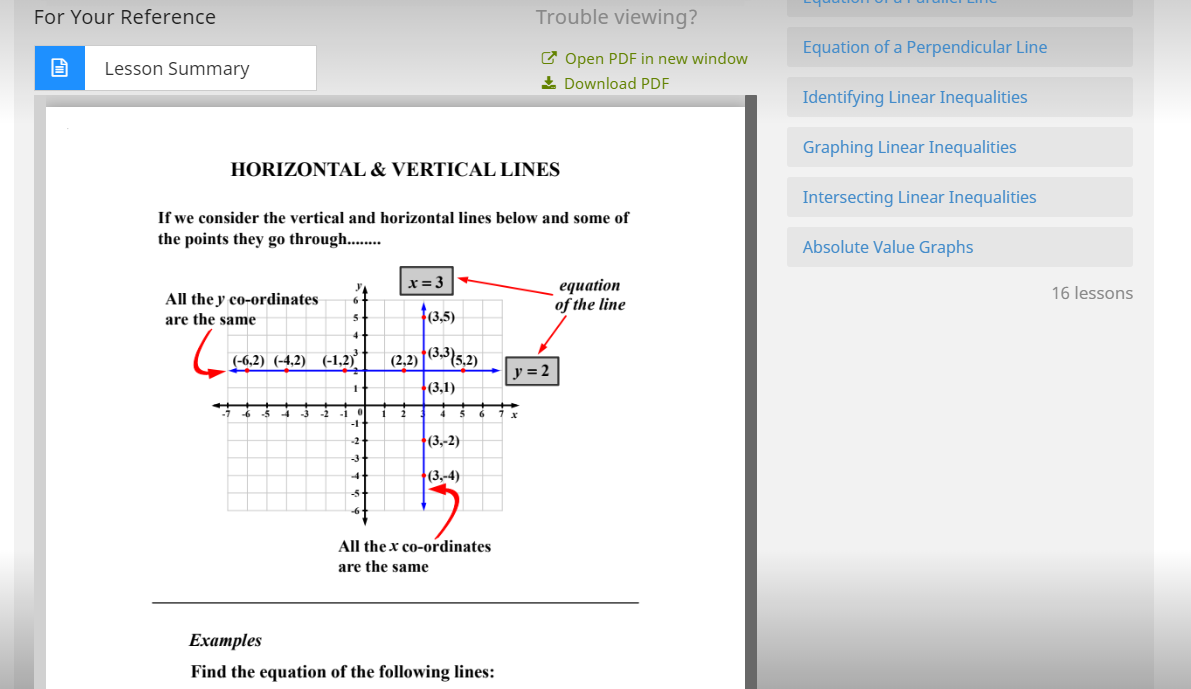
I am taking a hands-off approach for the summer for our teen's use of CTCMath. Once we officially start our homeschooling year again in September, we will go over his work on a regular basis. I like that we will be able to go over the lesson using the lesson summary (which is located below the video) by either having the summary open on the computer or printing out the PDF of the summary. I did print out the Algebra II checklist so I could keep track of what assignments were completed and when (along with the grades as calculated by CTCMath).

There are checklists for each level.


Setting Up Tasks 


As it is summer break for us, our teen was not as eager every day to complete his assignments but I wanted him to work on CTCMath at least three days a week. Because I wanted to schedule the lessons for certain days, I set up tasks for him. There were some days where he would skip and then complete multiple assignments on other days. I assigned him tasks so he would know what I wanted him to complete and I would get a daily email letting me know whether or not he completed the task. I really appreciate the emails to help me get track of my teen's schedule.

The tasks were set up from my parent login. I did find setting up the tasks to be rather tedious but necessary for our teen. I set up a few for our first grader but as I sit next to him when he is working on CTCMath, I stopped doing this after a few. Our teen completes the tasks on his computer while our two younger children sit with me using my laptop so I know exactly what they are working on each minute.

The lesson summary is a nice bonus to help parents figure out what the child is learning.

Algebra II Lessons 


Algebra II is split into three parts. Part One contains five parts with a total of 47 lessons. The topics covered in Part One include:


  • Linear sentences with one variable 
  • Segments, lines, and regions
  • Linear sentences with two variables 
  • Polynomials 
  • Factoring Polynomials 

The short videos take the problems step by step to teach the skill.

Part Two contains three parts with 29 lessons. The topics covered in Part Two include:


  • Rational expressions
  • Relations and functions 
  • Polynomial functions 


Part Three contains seven parts with 57 lessons. The topics covered in Part Three include:

  • Radicals
  • Quadratic equations and systems 
  • Conic sections 
  • Exponential and logarithmic functions 
  • Sequences and series 
  • Matrices
  • Extension 


The lessons have a short video which explains the concepts, online questions, and a worksheet to complete. We can either print out the worksheet or our son can complete the work in a notebook and then type in his answers into the area provided on CTCMath. The worksheet and the solutions can both be downloaded as PDFs to print out.


Elementary Lessons


Our younger children are working through the kindergarten and first grade curriculum. We usually complete about one lesson a day with them in the evenings. They watch their video and complete the questions. In most cases, our son will watch our daughter's kindergarten videos with her and she will watch the first grade videos with him.

Kindergarten is divided into four parts: numbers, patterns, and algebra; measurement; space and geometry; and statistics and probability. Our daughter has completed the first three sections in Part One: numbers, patterns, and algebra. She practiced her numbers up to 30, reviewed colors and sizes, worked on ordinal numbers, and learned about counting by 2s. All of the lessons were easy for her to follow, even at only four-years-old, except for the one about counting by 2s.


Our six-year-old is using the first grade level. He has worked through the entire Whole Numbers videos and questions of Part One: numbers, patterns, and algebra and has started the second section of addition. I really liked the first lesson on looking for tens. I think teaching children to look for tens within addition problems is a great way for them to be able to add three numbers.

I also had him complete four of the diagnostic tests from kindergarten to make sure he could work at the first grade level. I will probably have him go back and work on some more of the diagnostic tests when we complete this second section of Part One.

The lessons in the kindergarten and first grade levels are the perfect length for our two younger children. The videos are short and hold their attention while the questions are the perfect amount.

Question Bank Wizard 


To review concepts from previous years, I can create custom question banks for our teen using the Question Bank Wizard. Since he is taking Algebra II this year, I can set up tasks using the Algebra I questions to review material. It is very easy to manipulate and change the questions selected based upon easy, medium, difficult, or challenging difficulty levels.


Our Thoughts 


I am really enjoying using CTCMath for our homeschooling math curriculum this year. I watched the videos provided on the Parent User Guide which were extremely helpful to get started. They helped me figure out how to add students, set up tasks, and use the question bank wizard. And I also like the fact that I can switch to the student view from the parent portal so I can see it exactly as they do.


I can view all the tasks assigned to our children in one spot so I can see how far in advance I have prepared our homeschool schedule. The parent portal also provides me with the opportunity to see all of our children's profiles, awards they have received, tasks (active, recently expired, and upcoming), and weekly reports.


These are our children's three student profiles. I can see the lesson completed
and the overall grade at a glance on the parent portal. 

After I look at the student profiles, I can also view the weekly reports (which are stored on the server for three months but emailed to parents each week). These reports are great for looking at the status of tasks, lessons, and and log-ins. It is also perfect because unlike some other online homeschool resources, it tells you of the activity that occurs each day. So I can print it out and share with my husband if we need to discuss our teen's activity on CTCMath.

Our six-year-old son likes doing the Times Table Shoot 'Em Up which is similar to an arcade game. The player completes multiplication questions and shoots the correct answer with their rocket.

I am very happy that we will be using CTCMath this homeschool year. There are so many great features I am discovering each day – like the ability for our kids to choose a theme and change the colors (our younger son and daughter had so much fun picking out their themes this week).

Do You Want to Learn More About CTCMath? 


There are plenty of other reviews to check out to see what other families think of CTCMath. Check out the rest of the reviews to see if they are using one of the levels that your family might use. 


Wednesday, June 26, 2019

Learning Through Play: A Review of Matific Galaxy

screenshot of Matific Galaxy


Our son has been having a blast practicing and reviewing his math skills using Matific Galaxy—an online math resource for grades K-6. He has been working his way through unlocking ten different planets in the Matific Galaxy. This allows him to practice a number of different math skills through a variety of games.

For each level, our son needed to complete online math games in order to collect all the pixels necessary to unlock characters. Once the characters were unlocked, our son was able to dress the characters using the different outfits he won as prizes as he continued working through the different math games.

screenshot of Matific Galaxy

What is Matific Galaxy? 


Matific Galaxy is available for both the desktop and as an app for electronics such as tablets and phones with hundreds of fun math games. There are over 1,500 activities available across grades K-6. You can even try out Matific Galaxy before you purchase to see if it is the right fit for your homeschooling family.

In general, Matific Galaxy can be used almost entirely independently by your child. Our son was able to navigate most of the learning games without help from me. There were only a few activities which he had to ask me about and a few games where he needed assistance multiple times (example: Lucky Stars and Draw A Line). There are also audio and written instructions to help your child work through the planets, activities, and information by themselves. So, when our son let his sister take a turn, she could figure out the instructions even though she is not able to read everything yet.


Lucky Stars online math game

Lucky Stars online math game
I quite liked helping our son play this game. It is a lot fun to figure out which cards to use to collect the stars.


Be sure to check out the FAQ page if you have any questions and visit the site to try some of the learning games for yourself. When we were first told about the possibility to review Matific Galaxy, I asked our son to check out the site and try the games for himself to see if he liked it. After only a few minutes, he said he would like it if we got to review Matific Galaxy.

Playing an online math game

What Topics Has Our Son Been Practicing? 


The first grade topics practiced and reviewed include 60 different skills:

  • Dusty: counting, addition 
  • Kai: geometry
  • Jung Jung: counting
  • Blaze: counting, addition, basic fractions, subtraction 
  • Rocky: counting, addition, numbers measurements 
  • Icy: addition, counting, data analysis 
  • Sweetie: measurements, counting, subtraction, patterns, numbers, addition, basic fractions
  • Nickel: addition, problem solving, measurements, counting, subtraction 
  • Sir Goldy: numbers, subtraction, addition, mixed operation, geometry 
  • Queen D: addition, numbers, geometry 


The motivational messages are fantastic!

What Did Our Son Think? 


Since first playing, our 6-year-old son asks almost everyday if he will have a chance to play on Matific Galaxy. In addition to working on my laptop, I also let him play via the app on my phone. He will happily sit solving math problems and practicing his addition and subtraction.

"Turn Screen Time Into Learning Time"


Our son had so much fun the first day after we set up the accounts, he played for quite a long while. And when we downloaded the app to my phone, he was ecstatic!

One of his favorite learning games was with the first planet—Dusty: Get the Picture. He needs to correctly assign the bows, necklaces, and glasses to characters in a line by following ordinal directions. When everyone is wearing the correct article, a photo is taken of the Class of 2019.


Another favorite was Robot Lift-Off, where students need to add the number of robots (there are two different kinds). When the amounts are chosen correctly, the robots go onto the space ship and take off. Before this, they do a little dance, which our son likes seeing.


When our son completes all the first grade activities, he will receive a certificate. He is motivated by the prizes and achievements, so this is a perfect online learning opportunity for him.

My Thoughts 


I love that our son can work at his own pace. He can repeat games multiple times as he works on mastering skills and returns to play things again for more practice. The background music is also nice. So, if I am working at the table with his sister on something else while he is completing his math assignment, his playing the game is not distracting.

Another great aspect of Matific Galaxy is the Parent Zone. When I look at the Parent Zone, I can quickly see where our son's strongest subjects are and what areas he needs more practice in (geometry). I can also easily send him one of three motivational messages (which he enjoys).


Summary reports are available to be emailed to you once a week (or not at all, if you choose) or you can view them through the Parent Zone. I can view data based upon all-time, 3 months, one month, two weeks, or just the last week. The results are also displayed by topic with our son's score and the Matific average score.


And, finally, results are broken down by assignment. So, I can see how our son did on Dusty's planet, Kai's planet, or Jung Jung Planet's. After viewing these scores, I was able to ask him to focus on certain planets and games to practice certain skills as recommended.


The last thing in the summary report is the All-time Achievements which shows how many trophies our son has achieved during this time working with Matific Galaxy. I really like how easy it is to understand everything in the Parent Zone.

The only detraction I can find is that the progress from the desktop does not seem to transfer to the phone (they are not synchronized across different platforms). So, while our son is happy to repeat the same steps on the phone or tablet app as he had upon the desktop, I think maybe other children would be annoyed with having to repeat things.

Even though our son has everything unlocked on the desktop, they are still locked on the app.

We will continue to use the one-year subscription we received to review from Matific Galaxy through the rest of the year. Our son really enjoys it and I see it as a fun break to review and even introduce new math skills.

Do You Want to Learn More about Matific Galaxy? 


If you wish to read more about the other levels—since our son worked with just the first grade level—be sure to read the other reviews!