
Disclaimer: I received a FREE copy of this product through the HOMESCHOOL REVIEW CREW in exchange for my honest review. I was not required to write a positive review nor was I compensated in any other way.
Digital learning can be a great way to incorporate the practice of important skills such as math fact fluency and spelling. In our homeschool, when our kids can see learning as a game, they are even more excited about completing their daily tasks. Our family was given a one-year subscription to Spelling Shed and Math Shed to review in our homeschool. We used the program with our younger two children who are in kindergarten and second grade and used both the Spelling Shed and Math Shed platforms to practice different skills.

What is Spelling Shed?
Spelling Shed is an online spelling platform designed by teachers with the goal of making spelling fun. While the practicing of spelling and learning new words is fun, it is also easy for adults – parents and teachers – to manage the platform. There is an entire curriculum available with the site that you can use or you can add your own spelling lists for your children. You can even assign weekly work in the Teacher Hub.
So families (and schools) can use Spelling Shed either as a curriculum or a supplement to their own curriculum. I looked through the curriculum - which seems very thorough. There are 36 weekly spelling lists which contain one 20-30 minute lesson, resources to deliver the lesson, one spelling practice sheet, and one homework sheet. Since we already had a curriculum we were using, I put our spelling lists into Spelling Shed for our children.
 |
| Our daughter was able to select her spelling list from this page. As you can see she has worked on some more than others as indicated by the drone and the egg. |
What is Math Shed?
Math Shed provides number skills practice ranging from number bonds, addition, and subtraction to multiplication, division, and negative numbers. Students select which skill they wish to practice and then complete as many questions as they can correctly in 60 seconds. Just like with Spelling Shed, you can assign weekly assignments in the Teacher Hub.
Once your child is logged in and selects Math Shed, they will pick from the planets below to practice their different math skills. Once they pick a planet, they can even further narrow down the skill they wish to practice.
Once your child is logged in and selects Math Shed, they will pick from the planets below to practice their different math skills. Once they pick a planet, they can even further narrow down the skill they wish to practice.
 |
| What skill do you want to practice? |
 |
| Be even more specific – which area in multiplication? |
How Did We Use the Programs in Our Homeschool?
We used Spelling Shed and Math Shed in two different ways in our homeschool. On some days, both children asked if they could play the games. They enjoyed working together to answer questions, played a modified version of hangman on Spelling Shed, and wanted to collect as many honeypots as they could so they could purchase clothing, backgrounds, and accessories for their avatar.
On other days, I asked each child to spend time completing at least one activity on each program. Depending on if they were eager to go do something other than homeschooling, they spent more or less time completing multiple activities.
For each of our children, I inputted their spelling lists and assigned them tasks to work with those lists. As they worked more and more with the lists, they saw that the characters transformed from larva to drone and to worker bee. Both children liked that they could go back and work on past assignments to practice those spelling lists again.
What Do We Think?
I really liked that both of our children enjoyed working with Math Shed and Spelling Shed. They asked to play and sometimes I had to stop them from working on the programs. Anytime that our children willingly complete homeschooling assignments, it makes life easier.
I also enjoyed playing the bonus game, Bee Keeper, with them. It was fun to see if we could identify a variety of words. I think this also helped them think outside the box and learn how to spell new and more difficult words. (The Bee Keeper game did get harder when it was pulling from their spelling lists.)
 |
| One of the bonus games from Spelling Shed. |
I think that playing both Spelling Shed and Math Shed have helped both of our children increase their spelling fluency and math fact fluency. When working on his other math assignments, I see our son completing addition and subtraction questions more quickly and accurately. And I think the Spelling Shed has given our daughter encouragement with her reading and writing skills.
 |
| When children complete the spelling or math, it lists the words or problems and shows if they were correct or not. |
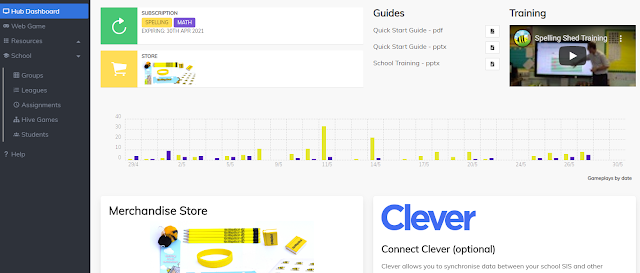
I loved that we could include our own spelling lists into Spelling Shed using the Hub Dashboard. This made it very easy to incorporate Spelling Shed into our daily homeschooling routine. It also didn't make it seem like this was just another online program that we were using. It was connected to our children's lessons.
I appreciate that our children could use the keyboard to type their answers if they wished or they could use the mouse to click on each letter as they attempted to spell it. This gives them another online resource to help practice keyboarding skills along with their regular homeschool work. And you can turn music, sound effects, and the reading of letters on and off in Spelling Shed. (I love an online resource where you can silence the background music.)
Finally, I also like that there are different levels. Below you can see how the easy levels and hard levels are presented in Spelling Shed. In the easier levels, the words are presented before spelling with fewer letter choices.

Our daughter's favorite part of Spelling Shed is the spelling of words. She likes counting in Math Shed. She also said she feels clever because the spelling is getting easier for her. She said it is helping her read better because she can read more books.
Our son loves that he can make his own lists in Spelling Shed. (He spends a lot of time looking around on his homeschool online resources to figure things out and find out what he can do.) He said, "I love that you can search for lists that people have made." He also likes the extreme level in Spelling Shed. He has set up his own lists where it requires him to capitalize letters (there is a button on the screen that acts as a shift key). When I asked him about Math Shed, he said, "I like the bonds to ten (number bonds)." He does see improvement in his math fact fluency after using the different parts of Math Shed.

I appreciate that our children could use the keyboard to type their answers if they wished or they could use the mouse to click on each letter as they attempted to spell it. This gives them another online resource to help practice keyboarding skills along with their regular homeschool work. And you can turn music, sound effects, and the reading of letters on and off in Spelling Shed. (I love an online resource where you can silence the background music.)
Finally, I also like that there are different levels. Below you can see how the easy levels and hard levels are presented in Spelling Shed. In the easier levels, the words are presented before spelling with fewer letter choices.

 |
| Spelling the word we in hard level brings in some extra letter choices. |
What Do Our Kids' Think?
Our daughter's favorite part of Spelling Shed is the spelling of words. She likes counting in Math Shed. She also said she feels clever because the spelling is getting easier for her. She said it is helping her read better because she can read more books.
Our son loves that he can make his own lists in Spelling Shed. (He spends a lot of time looking around on his homeschool online resources to figure things out and find out what he can do.) He said, "I love that you can search for lists that people have made." He also likes the extreme level in Spelling Shed. He has set up his own lists where it requires him to capitalize letters (there is a button on the screen that acts as a shift key). When I asked him about Math Shed, he said, "I like the bonds to ten (number bonds)." He does see improvement in his math fact fluency after using the different parts of Math Shed.
If you are looking for online programs to assist your children in spelling or mathematics, I recommend you taking a closer look at Spelling Shed and Math Shed. Our son said he would recommend Math Shed to someone if they were really struggling in mathematics. He also thinks Spelling Shed could help children of all ages who have difficulty with spelling. I think Spelling Shed and/or Math Shed might be good fits for your home during the summer break or your homeschool year-round if you want to practice skills.
Do You Want to Learn More?

Many Homeschool Review Crew families were given the opportunity to use Math Shed and Spelling Shed in their homeschools. Please check out their reviews to see how they used them.


